Composite IDs are a common pain point a beginning NHibernate user runs into. Here’s everything you need to get them up and running.
First, a caveat: composite keys are certainly mappable in NHibernate, but it’s a little trickier than a typical single identity key would be. Compared to a normal key, there’s some extra setup work, queries are a bit more painful, and they tend to be less optimized in terms of lazy loading. Because of these things, experienced NHibernate users often avoid composite keys entirely when possible. However, there are many legacy situations where multiple existing apps all hit the same db-a situation in which, if a composite key is already in place, it’s probably going to have to stay. As that’s the most common use case for composite keys, I’ll start from the assumption that you’ve got an existing database that you can’t alter. (this is a *bad thing* – see THIS POST for why, but as developers, those kinds of decisions aren’t always under our control)
YOUR OBJECTS
As I mentioned above, if you’re considering mapping a composite key, you probably already have a database. (if not, I’d highly advise an alternative-perhaps sets, perhaps idbags, but that’s for another blog post) The NORMAL, PREFERRED direction of model design would be to work up your classes and once they work the way you want, extract the persistence structure from that (i.e. your DB). But if that were an option for you… well, you probably wouldn’t be using a composite key in the first place. Anyway, let’s take a scenario:
Your existing tables:
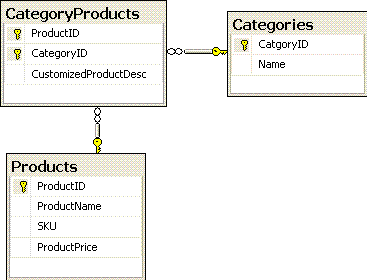
In our brand new NHibernate app, we want to have an object that corresponds to the CategoryProducts idea. This is a start:
view plaincopy to clipboardprint?
- namespace SuperShop.Domain
- {
- public class CategoryProduct
- {
- public virtual Product Product { get; set; }
- public virtual Category Category { get; set; }
- public virtual string CustomizedProductDescription { get; set; }
- private DateTime _LastModifiedOn;
- public override bool Equals(object obj)
- {
- if (obj == null)
- return false;
- var t = obj as CategoryProduct;
- if (t == null)
- return false;
- if (Product == t.Product && Category == t.Category)
- return true;
- return false;
- }
- public override int GetHashCode()
- {
- return (Product.SKU + “|” + Category.Name).GetHashCode();
- }
- }
- }
So, why the Equals and GetHashcode? If you try to map a composite key without them, you’ll get an NHibernate error stating that they are required. Here’s why: With this two part identifier, NHibernate can’t do a simple single id object compare – you need to tell it how to decide equality. Implementing Equals and GetHashcode are always a good idea for anyway so your objects will be have properly in cases like multi-session scenarios where an unsaved object might really be the same as an existing object elsewhere, but in the composite key scenario, not having it is not an option- NHibernate doesn’t even *have* a mostly-works technique to fall back on. (Note, this is almost certainly not the most ideal Equals and GetHashcode implementation-take a look here for more on the topic- but hopefully this gives you the general idea. )
MAPPING
A mapping:
view plaincopy to clipboardprint?
- <hibernate-mapping>
- <class table=”OrderItemProductDetails” name=”SuperShop.Domain.ComponentPersonalization, SuperShop.Domain”>
- <composite-id>
- <key-many-to-one class=”SuperShop.Domain.OrderItemComponent,SuperShop.Domain” name=”OrderItemComponent” column=”OrderItemProductID” />
- <key-property name=”DetailType” column=”DetailTypeID” type=”SuperShop.Domain.DetailTypes,SuperShop.Domain” />
- </composite-id>
- <version name=”LastModifiedOn” column=”LastModifiedOn” type=”timestamp” access=”field.pascalcase-underscore” />
- <property name=”DetailValue” column=”DetailValue” type=”String”></property>
- <property name=”DetailCharge” column=”DetailCharge” type=”Decimal”></property>
- </class>
- </hibernate-mapping>
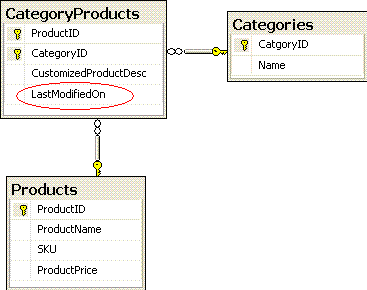
Note the <version> element, as well as the matching _LastModifiedOn in the class above. These two items combined let NHibernate know how to tell if an entity is new or not. In the usual scenario where NHibernate manages the ID, NHibernate monitors whether the id value is the original unsaved value and determines whether to Save or Update for you if you call SaveOrUpdate(), a very handy method. If NHibernate is not managing the ID, as is the case in an Assigned ID (think an SSN that you manage) or in composite (where you create the relationships or values yourself that make the id) then it doesn’t know how to tell if your id is saved or not-its usual technique doesn’t work. So with <version> NHibernate gets a column it has control over, and can safely monitor for an unsaved value. Without this, you’d be unable to use SaveOrUpdate with this element-you’d have to call Save or Update as appropriate-additionally, since ALL cascading functions on collections are essentially NHibernate calling SaveOrUpdate, you’re not going to be able to use cascading. Alternatively, if you don’t like the <version> column, you could implement IInterceptor ‘s IsTransient() method to get similar functionality. (see documentation at nhforge)
So, if you want to take the <version> approach, you’ll need to add a new DateTime column to your CategoryProducts table:
QUERYING
An inconvenient aspect of composite ids is the need to query on all parts of the id. For instance: a GetByID query:
from CategoryProducts c where c.Products = :p and c.Category = :cat
but it’s not just on the GetByID, it’s *whenever* you might need to search using a particular CategoryProduct. For instance,
select distinct p from ProductImages p join p.CategoryProducts c where c.Products = :p and c.Category = :cat
ID OBJECT
Composite IDs can be problematic for lazy loading… When lazy loading, NHibernate will get just the ids of a collection, and hold off on getting the rest of the object until it’s needed. An important fact- NHibernate can’t partially load an object-in terms of discrete “things”. If you’re talking a plain integer ID, it can load up the integer, and then load up the associated object later. With our object as specified above, the smallest single discrete thing that contains the key is… the whole object- so, you’ve effectively killed your lazy loading. What to do if we want lazy loading? Well, make something smaller that contains the key. Let’s make that ID object:
view plaincopy to clipboardprint?
- [Serializable]
- public class CategoryProductIdentifier {
- public virtual int ProductId { get; set; }
- public virtual int CategoryId { get; set; }
- public override bool Equals(object obj)
- {
- if (obj == null)
- return false;
- var t = obj as CategoryProductIdentifier;
- if (t == null)
- return false;
- if (ProductId == t.ProductId && CategoryId == t.CategoryId)
- return true;
- return false;
- }
- public override int GetHashCode()
- {
- return (ProductId + “|” + CategoryId).GetHashCode();
- }
- }
then, CategoryProduct becomes:
view plaincopy to clipboardprint?
- public class CategoryProduct
- {
- private CategoryProductIdentifier _categoryProductIdentifier = new CategoryProductIdentifier();
- public virtual CategoryProductIdentifier CategoryProductIdentifier
- {
- get { return _categoryProductIdentifier; }
- set { _categoryProductIdentifier = value; }
- }
- private Product _Product;
- public virtual Product Product
- {
- get { return _Product; }
- set { _Product = value;
- _categoryProductIdentifier.ProductId = _Product.Id; }
- }
- private Category _Category;
- public virtual Category Category
- {
- get { return _Category; }
- set { _Category = value;
- _categoryProductIdentifier.CategoryId = _Category.Id; }
- }
- public virtual string CustomizedProductDescription { get; set; }
- }
Mapping Tweaks:
view plaincopy to clipboardprint?
- <hibernate-mapping>
- <class name=”CategoryProduct” table=”CategoryProducts”>
- <composite-id name=”CategoryProductIdentifier” class=”CategoryProductIdentifier”>
- <key-property name=”ProductId” column=”ProductID” type=”Int32″ />
- <key-property name=”CategoryId” column=”CategoryID” type=”Int32″ />
- <version name=”LastModifiedOn” type=”timestamp” column=”LastModifiedOn” />
- </composite-id>
- <many-to-one name=”Product” column=”ProductID” class=”Product” insert=”false” update=”false” access=”field.pascalcase-underscore” />
- <many-to-one name=”Category” column=”CategoryID” class=”Category” insert=”false” update=”false” access=”field.pascalcase-underscore” />
- <property name=”CustomizedProductDescription” column=”CustomizedProductDesc” />
- </class>
- </hibernate-mapping>
The key thing to note here is that Product and Category are referred to twice in both the class and the mapping. The reason for this is that caching uses primitives like int or string, so we need to feed it something caching-ready.The reason for this is because to index by a custom class in the cache, this composite id class, like an ordinary id, gets serialized. This serializability comes for free if your id is a single int, but your id is your own custom object, as with this composite id class, you’ve got to explicitly both specify that serialization is allowed, and make sure the object is valid for serialization. So we’ve pulled out those ids as ints into the identifier. However, we still want to be able to traverse these relationships, so we still include the class. However, if NHibernate tried to update the same db field twice, you’d get errors. To be able to have both the product relation and the ProductId mapped separately in the same class, we mark the class reference as non-updatable. Also, note that the Equals and GetHashcode moved to the CategoryProductIdentifier class – the CategoryProduct class is for the most part free of the composite burden; the burden of composite-ness is now on the CategoryProductIdentifier class.
It’s entirely possible I’ve missed something in regards to NHibernate usage with composite keys-if so, let me know, and I’ll add it in. If I got anything factually wrong, let me know about that too so I can make it right!
EDIT: Added in serialization info that I’d forgotten. Thanks to bonskijr for letting me know!
Leave a Reply